Registration
Intro
The first step is to register the patient in RODAS. This process is done automatically from the Oncology Information System (eventually this process might be done from the hospital EHR).
TODO: Include two fields for patient identification. These fields should have an editable name (Example: NASI / NHC for CHUS).
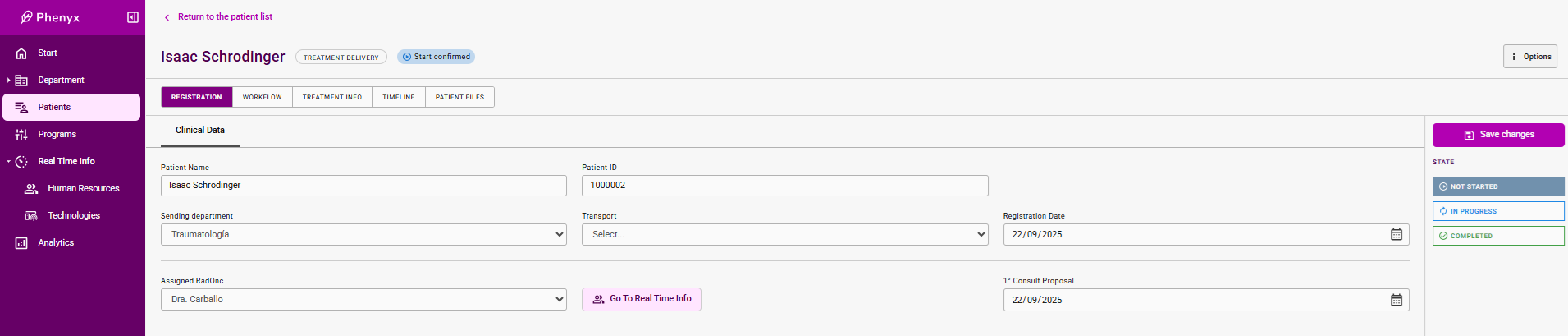
In the Registration Tab, some fields are automatically filled and others are completed by the radiotherapy staff.
Thus, info regarding patient name and IDs are automatically updated when sync with the master info provider (OIS or EHR).
On the another hand, Assigned RadOnc, 1st Consult Proposal, Registration Date, Sending Department, and Transport are manually defined by radiotherapy department staff.
TODO: Give direct access from this tab to the agenda (Real TIme Info) of the Assigned RadOnc, in order to chose and fix the appointment.
TODO: Add a new field Confirmed First Consult. This field should be equal to the Proposed First Consult but an event of confirmation is needed. This event is necessary to activate the sending of the appointment to the patient via the external appointment system. This confirmation can be done both from the Registration Tab and the RadOnc's Calendar.
Status Definition
Not Started : The patient is created but no staff has started the process of assigning RadOnc.
In Progress : Updating to this status is done manually by the radiotherapy staff. This means that the process of assigning RadOnc and first appointment is being undertaken.
Completed : Updating to this status is done automatically when Confirmed First Consult is filled.
General view of the Registration Tab